مركز الدعم
اعثر على إجابات للأسئلة الشائعة حول شرائح Syla eSIM وخدماتنا
أسئلة شائعة
ما هي eSIM؟
eSIM (الشريحة المدمجة) هي شريحة رقمية مدمجة مباشرة في جهازك (هاتف ذكي، جهاز لوحي، ساعة ذكية). تعمل تمامًا مثل الشريحة العادية دون الحاجة إلى شريحة بلاستيكية. يمكنك تنزيل خطة الهاتف مباشرة على جهازك.
كيف تعمل eSIM؟
بعد شراء خطة eSIM من Syla، يتم تنزيل الملف الشخصي وتثبيته على جهازك. يمكن لجهازك الاتصال بالشبكة المرتبطة بالخطة.
ما هي فوائد eSIM؟
تشمل المزايا إدارة مبسطة للخطط، تفعيل سريع، تقليل تكاليف التجوال، أمان محسّن، ومرونة أكبر دون الحاجة للتعامل مع شرائح فعلية.
هل يمكنني استخدام شريحة فعلية وeSIM في نفس الوقت؟
معظم الهواتف الحديثة التي تدعم eSIM تدعم الشريحة المزدوجة، مما يتيح لك استخدام الاثنين في الوقت نفسه. يمكنك اختيار أي خط للمكالمات/الرسائل وأي خط للبيانات.
ما هي الدول التي تغطيها Syla eSIM؟
Syla eSIM تقدم تغطية في 150 دولة ومنطقة. يمكنك العثور على القائمة الكاملة والخطط في تطبيق Syla eSIM.
هل يمكنني إجراء مكالمات وإرسال رسائل باستخدام Syla eSIM؟
لا، خطط Syla eSIM للبيانات فقط. استخدم تطبيقات البيانات مثل WhatsApp وMessenger وSkype لإجراء المكالمات والرسائل عبر اتصال البيانات الخاص بك.
هل جهازي متوافق مع eSIM؟
Checking if your device supports eSIM only takes a few seconds.
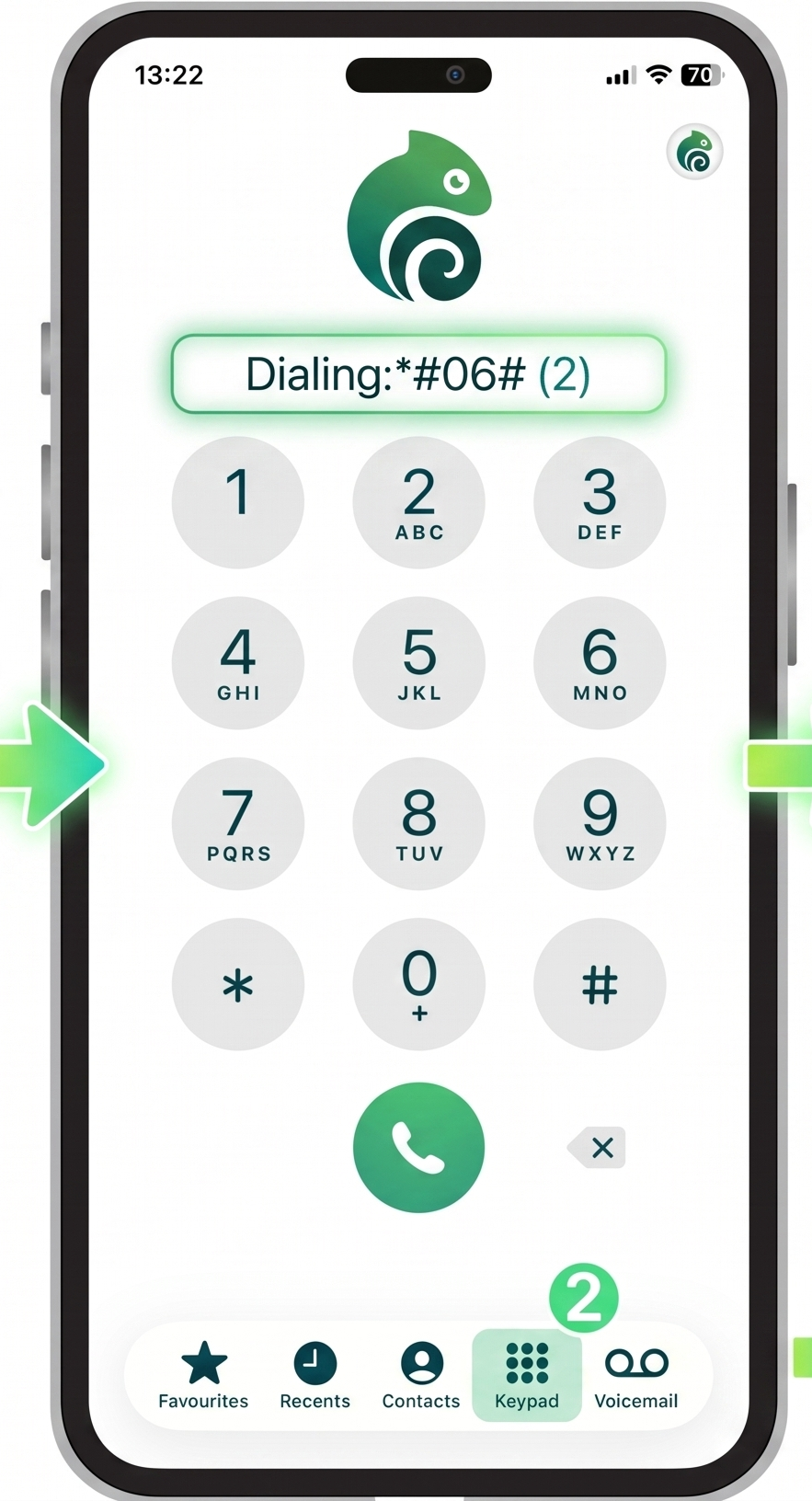
The fastest way is to dial *#06# on your phone. If an EID number appears, your device supports eSIM technology.
You can also verify compatibility directly from your phone settings. Since the process differs between iPhone and Android devices, follow the guides below.
Check eSIM Compatibility with a Dial Code
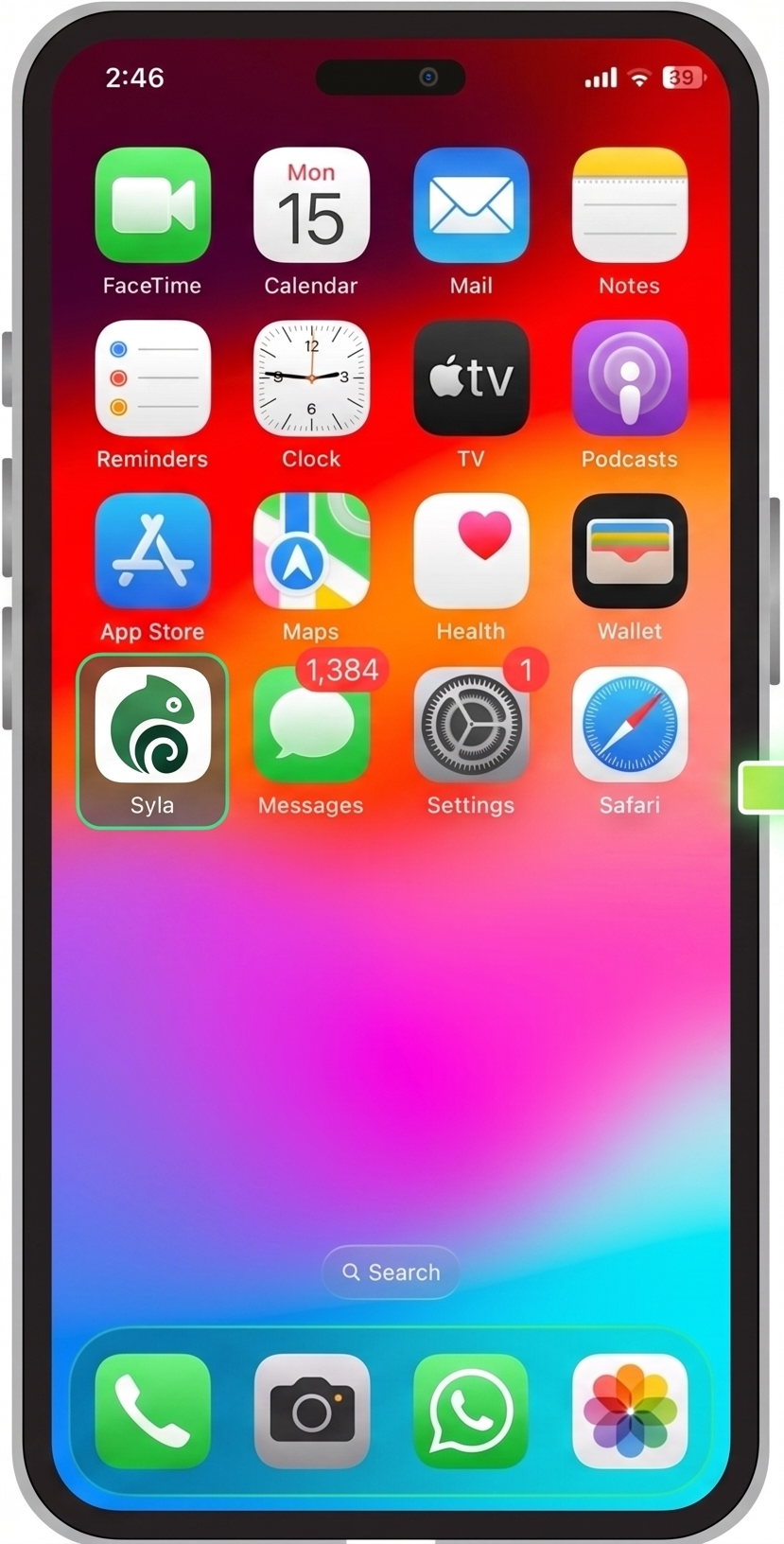
Dial *#06# from your phone's dialer.
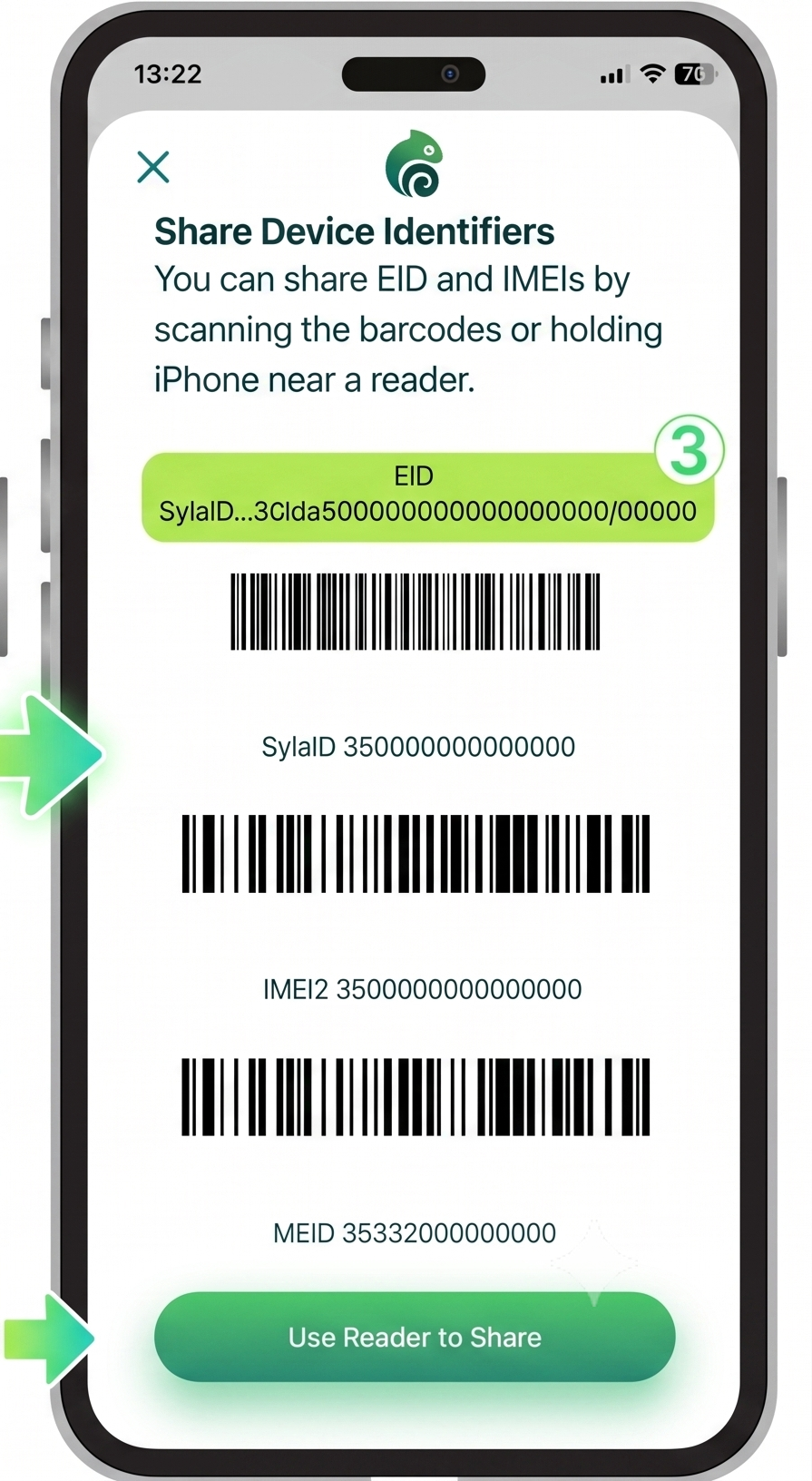
If the information screen displays an EID (Embedded Identity Document), your phone supports eSIM.
If you only see IMEI numbers and no EID, your device does not support eSIM and can only use physical SIM cards.
This check does not place a call. The device information screen opens automatically after entering the final #.
Check eSIM Compatibility in Your Mobile Settings
You can also verify eSIM support directly from your phone settings.
The exact path depends on your operating system.
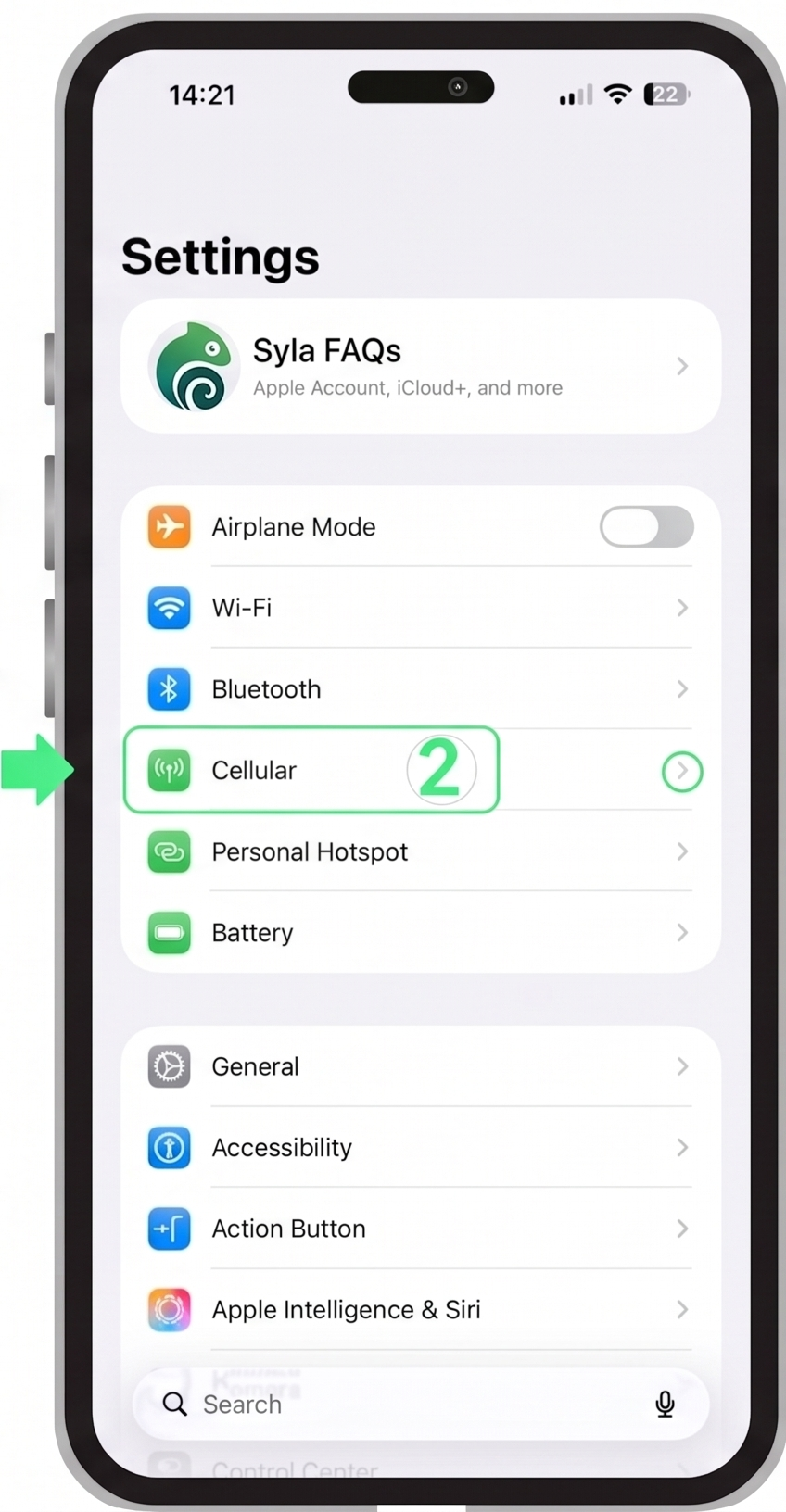
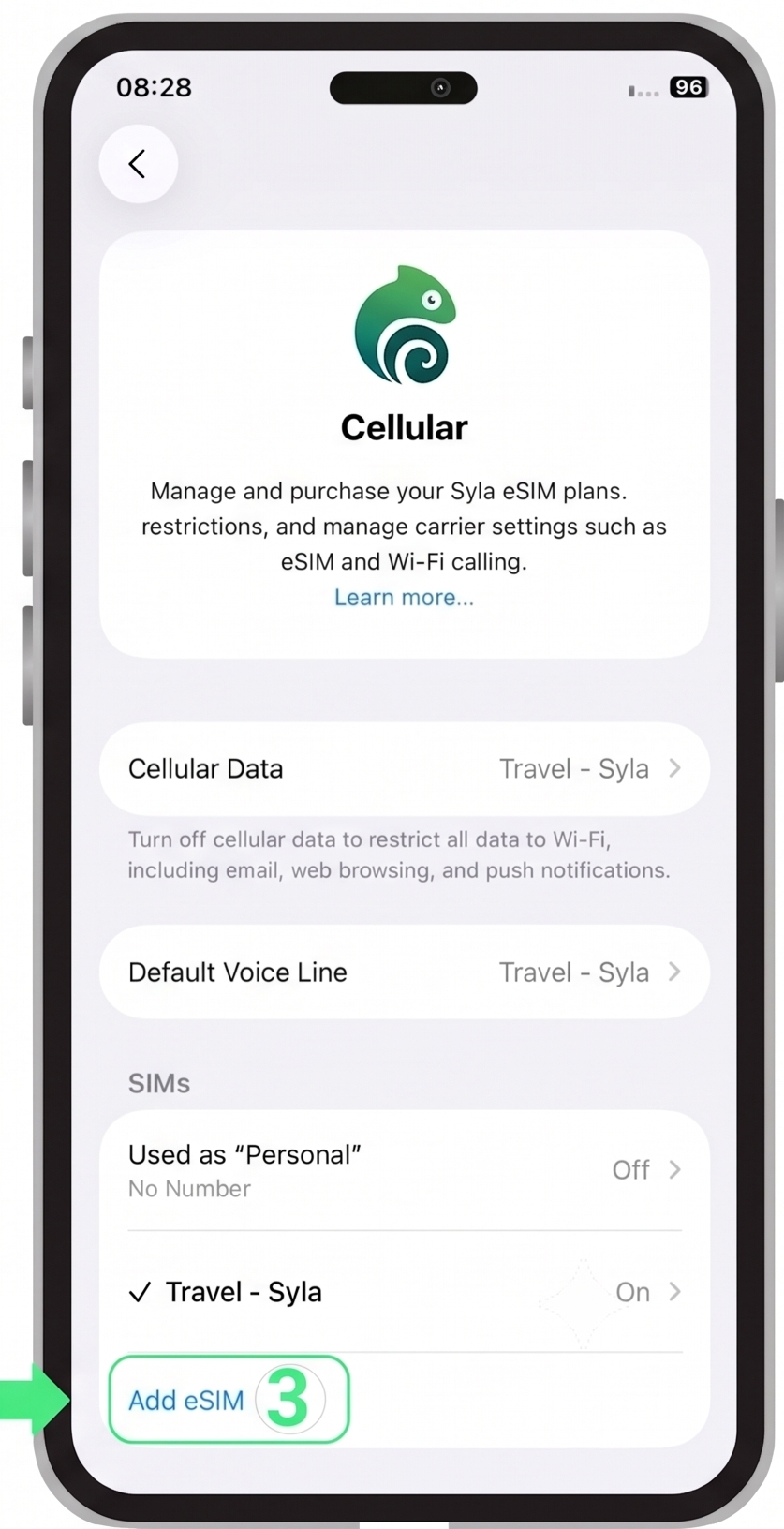
How to Find eSIM on iPhone
Checking eSIM support on iPhone is simple and works similarly across supported models.
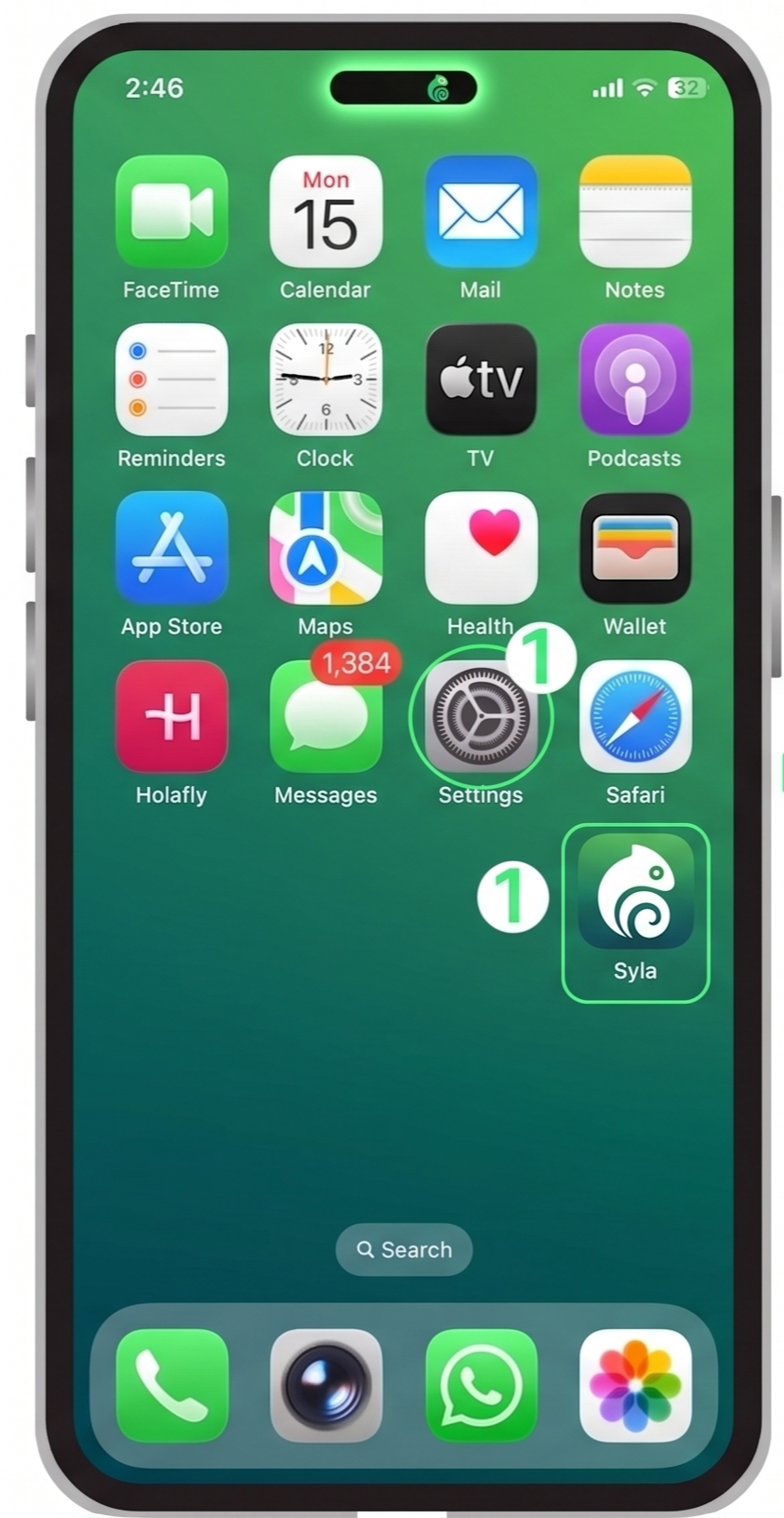
- Open Settings
- Tap Cellular or Mobile Service
- Look for Add eSIM
If the Add eSIM option appears, your iPhone supports eSIM.
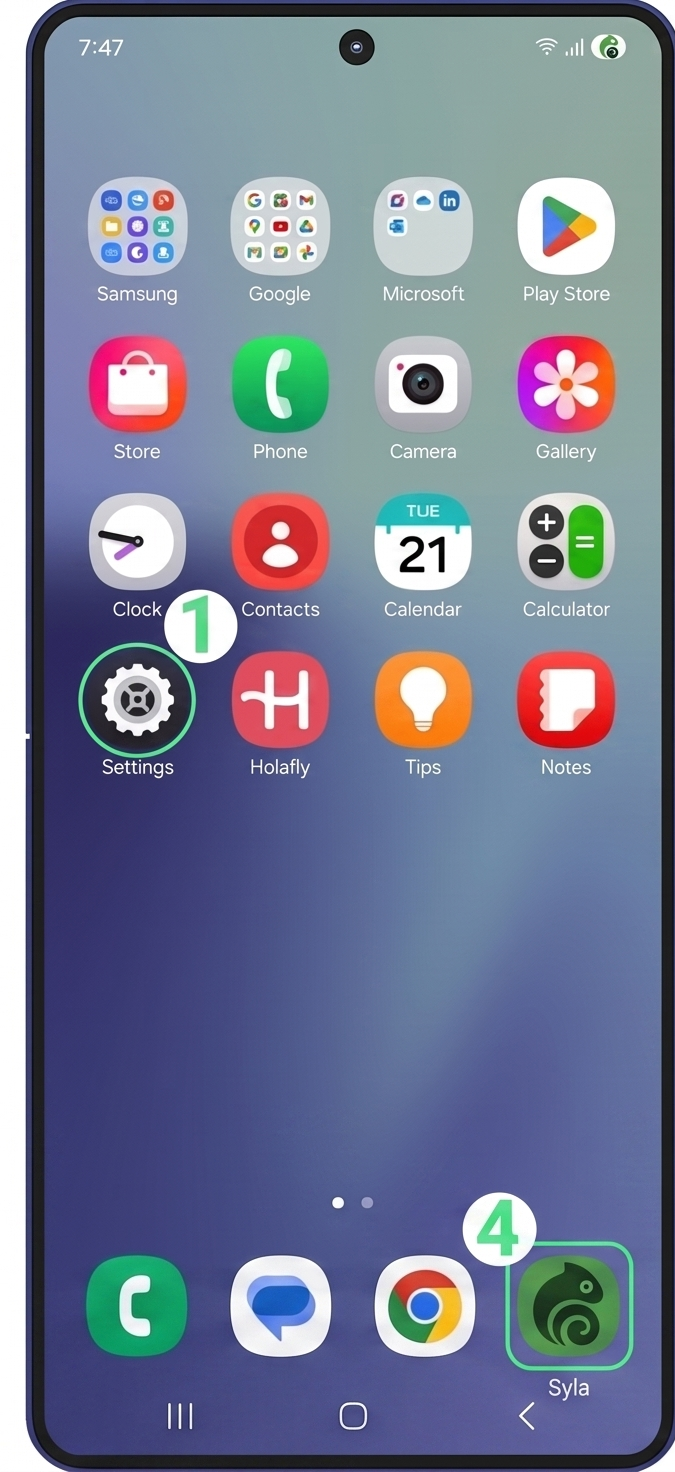
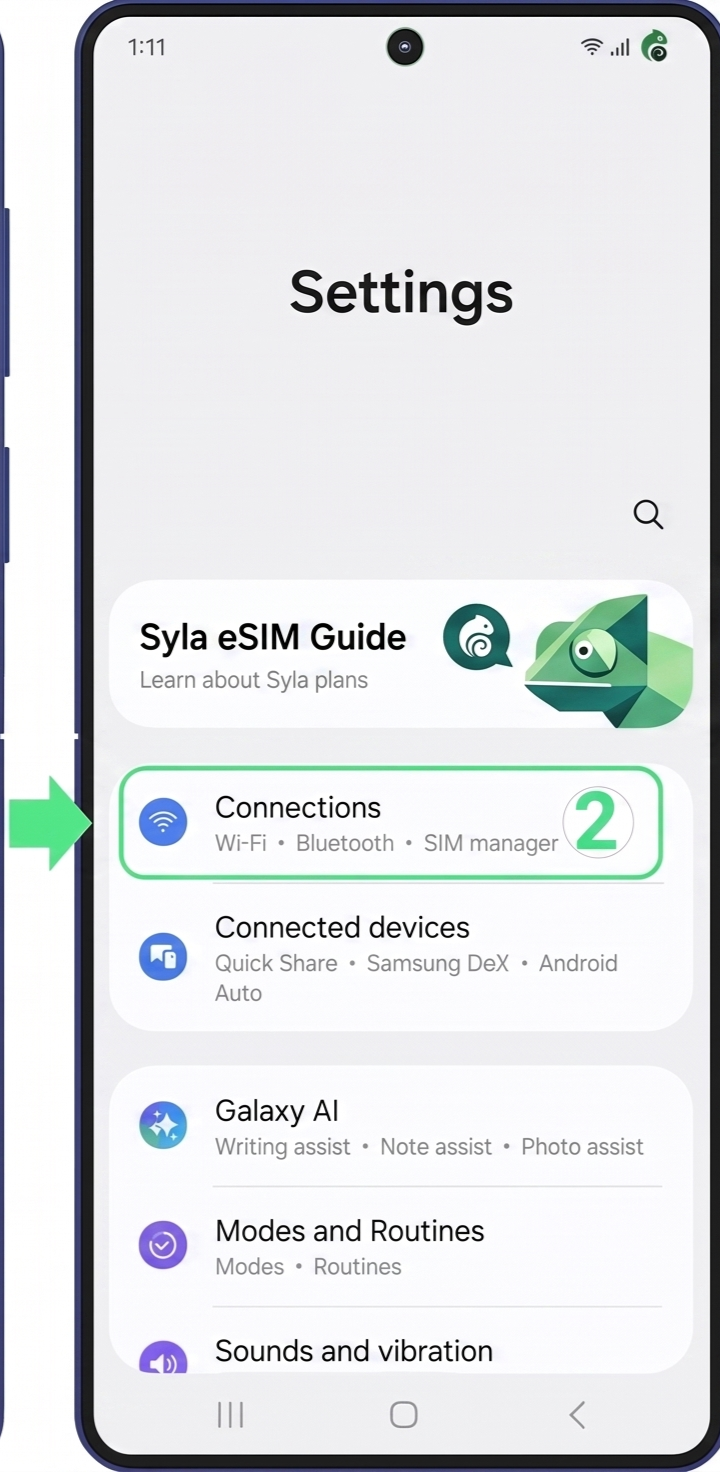
How to Find eSIM on Android
The exact menu path may vary depending on the manufacturer.
- Open Settings
- Select Connections
- Tap SIM Manager
- Look for Add eSIM
If the Add eSIM option is available, your Android device supports eSIM.
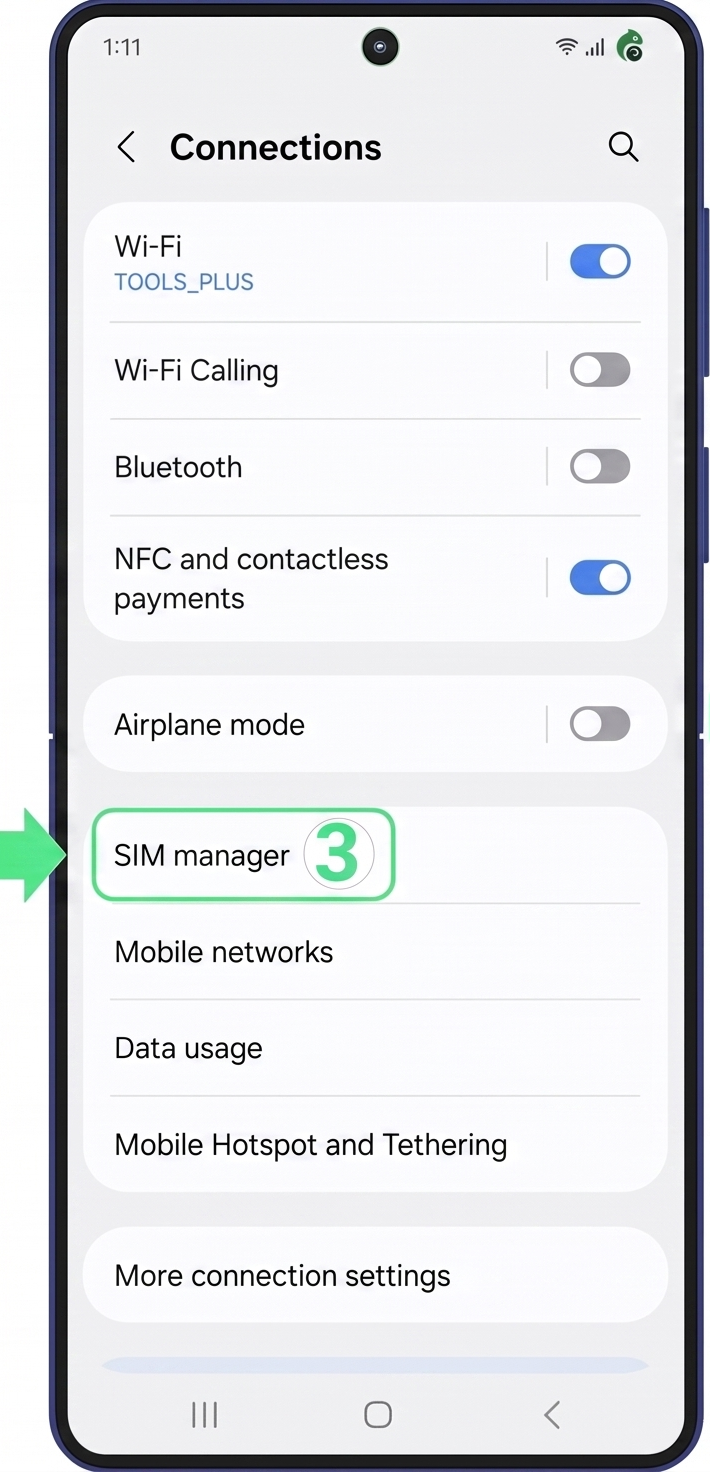
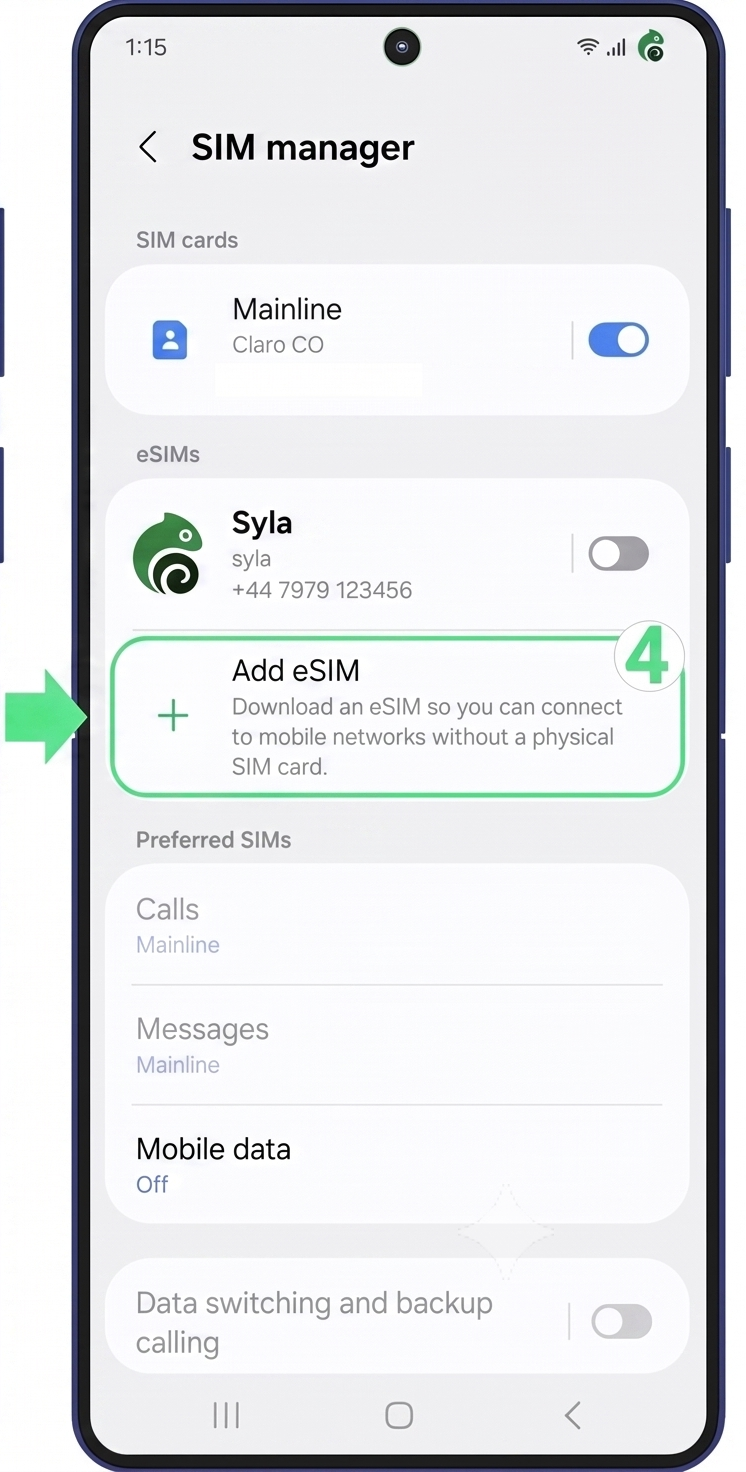
If you're using a Google Pixel, Motorola, Xiaomi, Huawei, or another Android brand, the menu path may vary slightly.
Things to Keep in Mind
- Some phones are restricted to a specific carrier, which may prevent eSIM activation.
- The country of manufacture can affect eSIM compatibility.
- eSIM availability can vary between versions of the same phone series.
What to do if your phone is not eSIM compatible?
If your phone doesn't support eSIM, you still have several options.
Use Another Device — Install the eSIM on another compatible smartphone or tablet.
Save It for Later — Keep the eSIM until you upgrade to a compatible device.
Share It — Give the eSIM to a friend or family member with a compatible phone.
هل يمكنني استخدام Syla eSIM على جهاز مقفل؟
لا، يجب أن يكون الجهاز مفتوحًا من قبل شركة الاتصالات الأصلية لاستخدام eSIM لدينا.
كيف أشتري Syla eSIM؟
اشترِ مباشرة من خلال تطبيق Syla eSIM. اختر وجهتك، حدد الخطة، وأكمل الدفع.
كيف أفعل Syla eSIM الخاصة بي؟
بعد الشراء، انقر يدويًا على رمز الاستجابة السريعة (QR) المقدم في قسم تفاصيل eSIM داخل التطبيق لبدء التثبيت. بعد التثبيت، قم بإدارة eSIM في إعدادات الشبكة في هاتفك وتأكد من تشغيل التجوال عند السفر.
متى سيتم تفعيل eSIM الخاصة بي؟
عادة ما يتم التفعيل تلقائيًا عند اتصال eSIM لأول مرة بشبكة مدعومة في وجهتك.
eSIM الخاصة بي لا تعمل، ماذا أفعل؟
جرب الخطوات التالية: 1) تأكد أن eSIM مفعلة ومختارة للبيانات في إعدادات هاتفك. 2) شغل التجوال لبيانات Syla eSIM. 3) أعد تشغيل الجهاز. 4) حاول اختيار شبكة مدعومة يدويًا.
لقد حذفت ملف eSIM عن طريق الخطأ، ماذا أفعل؟
عادةً لا يمكن استرجاع الملفات المحذوفة. اتصل بالدعم فورًا. قد تحتاج إلى شراء eSIM جديدة.
هل يمكنني نقل Syla eSIM إلى هاتف آخر؟
لا، eSIM عادةً ما تكون مقفلة على الجهاز المثبت عليه. ستحتاج لشراء eSIM جديدة لهاتف آخر.

Syla
متصلة · ترد خلال ثوانٍ
مرحبًا! أنا Syla. اسألني عن الباقات أو تثبيت شريحة eSIM أو إعادة الشحن.
هل ما زلت بحاجة إلى مساعدة؟
فريق الدعم لدينا متاح على مدار الساعة